Posts

Replace /- from all cell in excel

 To delete the "/-" from all cells in Excel that contain values like "২,০০০/-", you can use Excel's Find and Replace feature. Here's how to do it: Type-1: Open the Excel sheet where the data is located. Select the range of cells where you want to make the change. If it's the entire sheet, press Ctrl + A to select all cells. Press Ctrl + H to open the Find and Replace dialog box. In the Find what field, type /- . Leave the Replace with field empty. Click Replace All . Type-2 =SUBSTITUTE(D2,"/-","") Type-3 (also convert text to number) =VALUE(LEFT(D2,FIND("/",D2)-1))

Query In Access

Image
 1. Select Query When you want to select specific data from one or more sources, you can use a select query. A select query helps you retrieve only the data that you want, and also helps you combine data from several data sources. From Above Table Show Record with District Bogura only. Steps a. Click on Table-->Create Tab-->Query Design-->select table and click add and close-->Add those filed which we want to show b. add criteria and click Run then save query 2. APPEND QUERY Append b_batch record into a_batch record. at first set a_batch and b_batch id field is not auto number and primary key   a. create tab-->query design-->select b_batch and add field    b. click append-->select a_batch--> click run     c. save query 3. Using select Query to Calculate TOTAL, AVERAGE and GRADE a.  create tab-->query design-->select table and add fields b.   TOTAL: [DOS]+[Windows]+[D_Base]+[Network] c.  AVERAGE: [TOTAL]/4 ...

Create New Table in Access

Image
 Create New Table  1. click on create tab 2.click table Go to Design View 1.Go to Design View                 a. Process-1            b. Process-2 2. Type Table Name 3.Type Filed Name and Data type         Different Field Type in Access 4. Right Click on Table name and click Datasheet view Add New Filed     a. Go to design View     b. Right click on column name     c. Type field name and data type     d. go to datasheet view and type data     e. save table Set Field Properties Apply Validation Rules  Filed accept only value between 10 and 20

Create New Database In Access

Image
  A database is a structured collection of data that is stored electronically and organized for easy access and management . Databases can contain any type of data, such as words, numbers, images, videos, and files. A database management system (DBMS) is a software tool that helps users create, store, organize, and manage data . It's like an electronic filing cabinet that allows users to quickly find and access information. Microsoft Access  is a database management system (DBMS) from Microsoft that combines the relational Microsoft Jet Database Engine with a graphical user interface and software development tools. It is a part of the Microsoft Office suite and is designed for individuals and small-to-medium-sized businesses to create, manage, and interact with databases. Create New database: click start icon-->type access-->click access-->click blank database. 1. type data base name. 2. choose location. 3.click create icon.

count number of cell that contain red text

  Step 1: Open the VBA Editor Press Alt + F11 to open the VBA editor. In the editor, go to Insert > Module. Step 2: Add the VBA Code Paste the following code into the module: Function CountRedText(rng As Range) As Long     Dim cell As Range     Dim count As Long     count = 0     For Each cell In rng         If cell.Font.Color = RGB(255, 0, 0) Then ' Check for red text             count = count + 1         End If     Next cell     CountRedText = count End Function Step 3: Use the Function in Excel Close the VBA editor ( Alt + Q ). Go back to your worksheet. In a blank cell, enter the formula: =CountRedText(A10:A190)

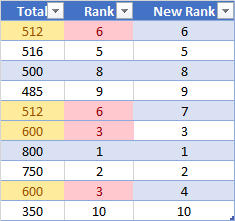
RANK with duplicate value in excel

Image
   Normal Rank  =RANK(C2,$C$2:$C$11,0) Rank With Duplicate =RANK(C2,$C$2:$C$11,0)+COUNTIF($C$2:C2,C2)-1

Authentication and Authorization in django and React project

 ////////////////Login Serializer//////////////////////////////////////// from rest_framework import serializers from django . contrib . auth import authenticate from rest_framework_simplejwt . tokens import RefreshToken class LoginSerializer ( serializers . Serializer ):     username = serializers . CharField ()     password = serializers . CharField ( write_only = True )     def validate ( self , data ):         username = data .get( 'username' )         password = data .get( 'password' )         if username and password :             user = authenticate ( username = username , password = password )             if user is None :                 raise serializers . ValidationError ( "Invalid username or password." )             if not ...